Noel Erskine, Technology Coordinator Norris Schools

Welcome to my technology blog.
Follow me on Twitter, @noelerskine
Noel's Home Page

Amazing web tools, several free apps and more in this week's posting.

Friday, February 24, 2017


Thanks for attending the tech sessions on our 2-17-17 PD Day!
Here is a link to the topics that I covered in my Google Session. (Some are just talking points I used during my presentation/demo so some of it may not be helpful.)   Thanks to all of the presenters for their willingness to help and share! 


Summer tech classes offered at Norris:
I have had several staff members ask if classes were going to be available again this year.  The answer is yes, and we would love to work with you! 

You can take the classes for 3 graduate credits through Doane College.  

Here is a direct link to a Google Doc that lists all of the offerings. Fee free to share this with other teachers/schools. 

GP Summit -  Last Call for Norris Registrations!  (We pay for your $219 fee!) 

Norris staff - If you are interested in attending, complete this form.  <---- Register now! - Due Monday, March 6th

Are you still a reply all kind of person?

There are times it's very appropriate..... but other times it's not....

As you know my office is right next to Dr. Skrett's and Dr. Maschmann's office... and I recently overheard a conversation about a new guy they are hiring to address this.... I figured I had better warn everyone.  


 (I know... It's only funny if you have seen the movie Taken.) 

Web sites, tools, and resources:

Learn how your students can use Adobe Spark (I love the Spark Tools!) to easily and creatively tell their own stories to the world. (I love the free Spark tools.)  (This article mentions the app, but they are great web tools for Chrome on the Chromebooks, Mac's and PC's. And yes... their apps rock too!) 

Here are some other great ideas for taking Kahoot! to the next level.

There are now over 13.9 MILLION public Kahoots created! ... Are you using this fun, free, online assessment game?  6 Creative Ways to Use the new Jumble Feature on Kahoot


Krita Is a Fast, Flexible, and Free Photoshop Alternative Built by Artists.  I Have not had a chance to try it out... but the price is right and looks great! 


Even though President's Day is over,,, check out these resources - 9 Presidents’ Day Apps and Websites


Lantern - Search Thousands of Media History Documents  The Media History Digital Library is a massive archive of books and magazines about the history of film, television, and radio.

How do I import my Google Classroom roster to Khan Academy? Two powerful tools working together! 

Google templates:

Google Templates for Students - Looking for a template to get your students started on a project? We’ve found some great Google Docs templates to use as they are or change up to match your classroom.

Google Slides:


Google Forms:

How to Use Google Forms for Your Business - (Great applications for schools too.) 


Google Sheets:


5 Great Google Sheets Add-ons for Teachers (There were a couple new ones for me in this list!) 

eBooks:

10 great websites to access and find quality audiobooks for your students.

Remind - nice tool for reminding student's and parents via text messages.
They do not know your cell number... and you do not know their number!  It's free for teachers to use.  (They charge for a district plan... but we use School Messenger for those needs.)  Check it out. 


Free Apps -


***** FREE FOR LIMITED TIME *****

Turns your iPhone or iPad into full-featured PDF document scanner.


Moose Math is a cute free app from Duck Duck Moose and Khan Academy. The app is designed to help young students learn how to count, how to add, and how to subtract.  Note - IOS & Android

Some great web sites, tech opportunities, tips, a couple handy apps that are free for a limited time.. and more in this weeks tech tips!

Tuesday, February 14, 2017


A note to just my Norris staff, but aplicable to most school districts...Please print to the copiers when possible!
Are you sending your print jobs to the copier? If so... you are saving the district money!
It costs a lot more to send print jobs to the HP printers than to the copiers.  Many districts limit the amount of prints and copies teachers can make.  This is something we have avoided, but we do appreciate anything staff can do to help out.  The printers are there for a purpose so feel free to use them.  But if you are printing a lot of copies... please send the jobs to the copiers.  (The copiers also duplex... so it saves paper as well printing costs.)

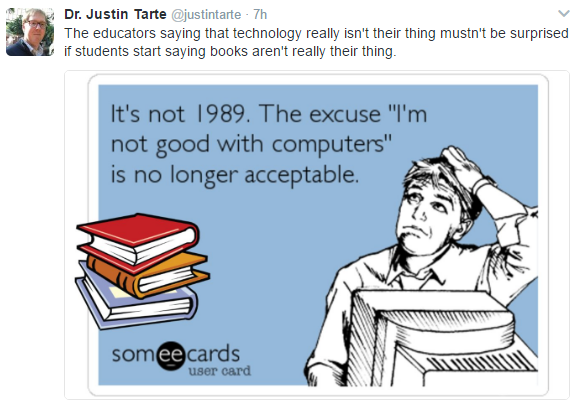
Hope this is not you:


I hate to say this... but you know me... never a shortage for words!  The above statement is true for almost everyone, not just educators. (Para's, Custodians, Bus Drivers, etc...) 

The Nation Needs More Cybersecurity Teachers - Great opportunity for you and your students!


Receive 8 Clock Hours of CEU Credit - Online and Free! 

Corporate-Funded Scholarships Enable Cyber Teacher Professional Development At No Cost to You or Your School. Be Part of the Solution to the Cyber Skills Shortage.
1 Million Open and Unfilled Cyber Positions in 2016. Cyber job growth is on the rise.

Norris teachers - If you are interested - Let me know! (There will be a reward for any teachers completing this!)

Tech tools and websites: 

How to Create Gorgeous, Professional Graphics in Minutes - Via BetterCloud Monitor | Don’t have professional design chops? No worries. With Canva–which has been dubbed “the easiest to use design program in the world”–it’s super simple (and free) to create beautiful graphics. (Canva is one of my favorite tools!)

Use Google Drive to Fill Out PDF Forms  Via BetterCloud Monitor | If you don’t have the right software, filling out PDF forms on your computer can be a frustrating experience. Luckily, this trick using Google Drive makes filling out PDF forms a breeze. 

Alice Keelers 892 Quia Math Activities - You can copy to your Quia account and edit, or just use them as-is without an account. 

Save your screenshots instantly to Google Drive with this Chrome extension. 

The New York Public Library just released a treasure trove of images you can use for free.

5 Secret Google Drive Keyboard Shortcuts to Impress Your Friends With - Via BetterCloud Monitor | To get the most out of Google Drive, there are a few little-known keyboard shortcuts you can use. Here are five shortcuts for common tasks that’ll power up your productivity (and impress your friends).

1-2-3 Easy Drag & Drop Website Creator for Teachers and Students - (This article features Adobe's free Spark Page App/Site.  Great for creating online fliers, online posters, etc....  VERY easy to use!) 

Some great resources from out very own Katie Elder. She participates in the Technology Leadership group at our ESU 6. Check out her top 8 resources in this Google HyperDoc. (Interactive Google Document that allows you to link to websites and resources,) 

9 Ways to Create Videos on Chromebooks - Some new one's on this list. Via Free Technology for Teachers. (Richard Byrne - a tech rock star.) 

A Great Example of Using Google Maps in Science via Free Technology for Teachers. 

Use this Awesome Tool to Take Notes While Watching Videos - Via BetterCloud Monitor | VideoNot.es lets you watch any video and take notes side by side on the same screen. It also automatically syncs your notes and video. Plus, your notes are stored in Google Drive for easy access and sharing.  Article here  and short video (2 Min.)  I have promoted this one in the past... it's a winner for any class assignment where you want kids to watch a video and take notes on the video. 

Six Tools for Collaborative Brainstorming - A Comparison Chart

Eight important Google Docs tips for teachers and students. I bet there are a few you have not used with your classes. 

Google Chrome Extensions: A Big Ol List - Alice Keeler's list of useful Chrome Extensions.  (Notice how she used OneTab to simply create this list and share it with one simple URL.) I love OneTab. 

Know Students Better: 17 Tools for Formative Assessment  (Some great ones in this list (Plinkers, Socrative, Seesaw) and some new ones!) 

Internet Archive's Wayback Machine is a digital time capsule of the World Wide Web...

Turn Google Sheets into an Automatic Bookmark/Citation Tool - When you’re doing research online, you don’t have to manually collect and save information. Try Citable, a helpful Chrome extension that simplifies how you gather research.

Download YouTubes - I was recently asked what my favorite site/tool is for accomplishing this.  Check out this site. 

Ultimate TCEA 2017 Ed Tech App Roundup. (Many new sites & Apps in this list!) 

Reading & Math Websites for Parents
Thanks to our very own Alisha Bollinger and staff for putting together this great list for parents.  It includes websites that are useful for parents looking for additional resources for home. 


Google Drive:

To Find Files in Google Drive, Search Like You Talk - Watch this short 2 minute video to get to started. 

Google Drive:


Google Sheets:

Link to cell ranges in Google Sheets - Because it can be difficult to navigate large and complex spreadsheets, we’re introducing the ability to link to specific cell ranges in Google Sheets on the web.


Google Sites:

How to Organize Pages in the New Google Sites - Via  BetterCloud Monitor | New to the new Google Sites? Don’t worry. Let’s go over some of the basics. We’ll cover adding, deleting, hiding, nesting, and reordering pages.

Google Slides:

How to Use the Q&A Feature in Google Slides  Via BetterCloud Monitor | With this interactive Q&A feature, you can collaborate with your audience by allowing them to submit questions and vote on them during Slides presentations.


Google Forms:

Add Images to Questions and Answers in Google Forms - Via BetterCloud Monitor | With this feature, you can insert images into survey questions or add images as multiple choices options. (This was released in the fall of 2016.  Great for quiz questions, etc... Hopefully you have already used this feature!) 

Your Computer is Infected - Please call this number!

Do not fall for this one... but people do.... 


Basically,  you have been directed to a site that will display this page or pop-up and get you call a number so they can get your credit card number, and charge you a fee to "Fix" your problem.  Be smart... do not fall for these scams!

Some free apps:

RadioApp - A simple radio for iPhone and iPod touch by Tal Shrestha gone FREE

Price Drop: $1.99 --> FREE  Easily tune in to local radio stations and to radio stations from all over the world, using a unique analog-like tune

Magnifier Flash - VERY HANDY! A magnifying glass with light by Tekton Technologies (P) Ltd. gone FREE

Price Drop: $0.99 --> FREE

​

Free family movie on Google Play, tech tools, Google tips and more in this week tech tips!

Saturday, January 21, 2017

For a  limited time, get the new movie Bunyan & Babe free before theaters, only on Google Play. Watch the hilarious new family comedy now. Add this to your Google Play account today for free!  (I added it my personal Gmail account and my school account.)


​

Misc. websites and tools

Want to create or scan a QR code on your Chromebook?  This extension is for you. 

YouTube Kids - App. <---Great for parents! Dive into a world of discovery, learning, and fun.  YouTube Kids gives your family an easy way to watch their favorite shows, or explore anything that captures their imagination. It’s free, simple to use, and full of family-friendly videos. This is a great app for parents and control over what videos your kids can watch! 


The New York Public Library just released a treasure trove of images you can use for free.


Create Audio Recordings and Save Them In Google Drive via Free Technology for Teachers 

Don't get scammed!
Savvy phishing attack targets Gmail accounts with high success rates - We have warned you about these... but some are still getting compromised!  Another article just came out on this one - There's a new Gmail phishing attack going around, and it's fooling everyone.  The irony of this is that before I sent this email and posted this on my blog, (Was sitting in my drafts for a while before I sent/posted this.)  we had a staff member's account get compromised.  I put together this document to assist our staff members, so maybe it will help you as well. 

Website and tech tools:

Check out www.toondoo.com it is killer.  Our very own Jason Cullison (@cully11)  uses this site and loves it!  (Visit with him to help get you started.)  Create your own Cartoons. 

Google Docs:
How to Use the Google Docs Outline Feature on Your iOS Device - Via BetterCloud Monitor | The outline feature in Google Docs is a great time-saving tool for navigating through long documents. If you do a lot of work on your phone, then this can make working on-the-go even easier.

Google Sheets:
The Power Tools add-on for Google Sheets is a must if you are doing a lot in sheets! (Adds a ton of features that many power users will want.) 

How to Automatically Alternate Row (or Column) Colors in Google Sheets - Via BetterCloud Monitor | Applying some color to alternating rows in a spreadsheet can make it easier to read. Here’s how to use conditional formatting to automatically create a colorful and attractive spreadsheet in Google Sheets.


Google Classroom: 

Updated and improved Google Classroom cheat sheet (Great use of Google slides and how you can jump to other slides in this cheat sheet. Check it out1) 

Google Slides:

How to Use Speaker Notes in Google Slides - Via BetterCloud Monitor | If you want to add extra notes that only you can see during a presentation, try using the speaker notes section in Google Slides.

Google Forms: 

Google Forms: Choose a Random Winner - Choose a random winner from those who fill out your Google Form. 

Google tools, free apps, tech tips and more in this week's findings.

Monday, January 16, 2017


The 11 Best G Suite Updates of 2016  - Any that you like in this list?  Via BetterCloud Monitor | 2016 was an exciting year for G Suite! Whether it was improving existing features with machine intelligence or rolling out new products entirely, there were lots of updates that are helping us work faster and more efficiently now. Here’s a roundup of our favorite updates from 2016.

Randomize Answer Options for Google Forms - Via BetterCloud Monitor | Randomizing the order of answers is great because it can remove some of the inherent bias that comes with a survey. This way, you can get a more accurate depiction of how your survey takers feel.


This chart features over 30 educational YouTube Channels for teachers. 

How to run a Mystery Google Hangout/Skype. This doc will get you started.

Instantly Access Over 20,000 Books for Kids 12 and Under, Epic! is Free for Elementary School Teachers and Librarians!

Elementary technology favorites by grade level. (Free and Paid resources.) There are a ton of great resources... Make sure you check out See Saw (free version) under the second-grade section! SeeSaw Now Supports Text Labeling - 15 Lesson Plans for Using Labels. Connect Your Classroom Through SeeSaw Connected Blogs - Another nice feature of this product. 


MoocNote Offers a Chrome Extension for Taking Notes on Videos


This one is a Winner!  We were going to have a session on this during our PD on the 16th, but icy weather won out.  Apparently, teachers across the nation think it's a winner too... EDpuzzle - Readers' Favorite App. 

Google Classroom:

Every student is unique. Use today's new Google Classroom feature to assign work to individuals based on their needs. (Assign to a group.)  Check it out! <--- New 1-11-17

Google Chrome:

Tip:  Customize Chrome To Always Open Specific Pages (or Wherever You Left Off)  Via BetterCloud Monitor | Chrome can automatically open specific pages (like your email, calendar, news, etc.) every time you open it. Chrome can also automatically pick up where you left off, opening the same tabs you were viewing when you closed it.

How to Uninstall Chrome Apps and Extensions Via BetterCloud Monitor | Sometimes, that Chrome app or extension you installed just isn’t doing it for you. Things don’t work out. Here’s how to remove it in a few easy steps.

Ten free ways to create videos on Chromebooks.  Via Richard Byrne ‏@rmbyrne As Richard mentioned at the end... YouTube is often overlooked and they have some great creation and edition tools. 

Google Sheets:
Sparklines in Google Sheets - Via BetterCloud Monitor | Want a quick look at data trends in Google Sheets? Check out the Sparkline function, which creates a miniature chart inside a single cell.

Split Names Into Two Columns in Google Sheets - Via BetterCloud Monitor | Have you ever had a spreadsheet containing a list of names and needed to split them into separate columns for first and last names? You usually would have to write a complex formula to orchestrate such a simple task, but the Split Names add-on for Google Sheets removes the need for formulas.

Google Expeditions:
If you have not had a chance to experience this... talk to Josh Murtaugh to see this in action.  Here is a list of Google Expeditions.  More info on Google Expeditions can be found on their home page. 

Apps:

Amazing new Toontastic 3D storytelling app for Android and iOS now available, and it's free!  GET CREATIVE IN CLASS... With Toontastic 3D you can draw, animate, and narrate your own cartoons. It’s as easy as play. Just move your characters around onscreen, tell your story, and Toontastic records your voice and animations and stores it on your device as a 3D video.

Math Master IOS app (Free or a in-app purchase to remove ads.)  There are 7 challenging games in 1 single app.  Students can play basic addition, subtraction, multiplication, and division as well as other math applications.   

Free IOS app, some great tech tools, and some surprising findings in tech and schools - In this weeks tech posting.

Tuesday, January 10, 2017

IOS Apps:
Great Free IOS app for audio recording and editing. TwistedWave Audio Editor  (Reg $9.99) - Free today! (1-10-17) 

Math Resources:

G Suite for Education - Recharge Learning - Digital Math Resources for K-12 A really nice document of resources.


Misc. Web tools and resources:
TechNotes - Our 2016 Google Resource Roundup. A really nice list of tools! 

This interactive website lets students listen and learn about animals and habitats around the world. The great animal orchestra.  - Pretty cool!

WriteReader - Collaborative Book Creation for Elementary School Classrooms.


Mercury Reader for Chrome provides ad-free, distraction-free reading. (Similar to the old Clearly extension, and others.)  Great to have in the toolbox! 


Google Apps: 

Crop, Rotate, and Add Borders to Images in Google Docs - Via BetterCloud Monitor | Along with the ability to crop images into slightly smaller versions of themselves, you can also crop them into specific shapes, called masks. Pairing this with the ability to add a custom border to your images definitely gives you a lot more flexibility in Google Docs.


Got Google Photos? This guide will help you get around the service like a pro: 

Google Drawings cheat sheet for teachers and students.


Should kids have school-issued devices?  Should we be using YouTube?  Surprise.... top parent concern is...... 

Over 100,000 people have shared their views on education via the Speak Up survey, and here is what they are telling us:

10 Things Parents Told Us About Digital Learning
 
10 Things Students Told Us About Digital Learning

10 Things Principals Told Us About Digital Learning

Some Tech Tools and tips for your Christmas break.

Tuesday, December 20, 2016

Need an icon?  The Noun Project to the rescue. 


www.resumebeacon.com  is a free resource that students can use to create their own resumes or resumes for literary or historical figures.  Remember, Google Docs Home page has some resume templates too.  (The old templates gallery is still active, with a lot of templates for a variety of things.) 


Adobe Spark Now Lets You Insert Videos into Your Videos - The best keeps getting better.  I love this app for simplicity and ease of use! Both web and app based. 


Google Forms -- Don't get caught in this situation!  Google forms do not have revision history or undo options like most of the Google products. When you create a new Google Form, a spreadsheet is not automatically created, so the data is just stored in Google forms.  Make a spreadsheet right away to have all of your form data written too!  Without this, if you delete a question... all of the associated responses are deleted... since they were not written to a spreadsheet.  (This recently happened to one of our staff members, so I hate sharing this tip based on bad news.... but don't let it happen to you.) 


Kahn Acadamy -  NEW - We’re excited to bring you our newest subject — Grammar! We created Grammar to help both native and non-native English speakers at all levels. In the new course, our resident grammarian, David, and our team of grammar experts explain punctuation, parts of speech, style and usage, and Standard American English conventions. As with our other subjects, students can review topics and work on practice exercises if they need some extra help outside of class. We hope you’ll check out our new videos, articles, and exercises and share them with your students if you find them helpful. If you are not familiar with Kahn Acadamy... you need to be!  It's an amazing free resource for teachers, parents, and students! 

Math tools:
3D math modeling to go! Create solids, spheres, planes, cross sections and many more three-dimensional objects. Solve linear geometry problems, plot z = f(x,y) functions and more.... GeoGebra's tools are great for any mobile device and/or computer.  They are free too! 


YouTube tools:
Need to download a video from YouTube?  This online converter is awesome.  Tips: Make sure you select a video format for downloading. I recommend mp4.  If you upload your video to Google Drive, it will take some time for Google to process the video before it's ready for playback. 

I have mentioned this in the past... but it's currently my favorite Chrome Extension for YouTube. Magic Actions adds a lot of features that you will love. Enhance your YouTube watching experience! Auto HD, Ad Block, Cinema Mode, Mouse Wheel Volume Control, Screenshot... Check it Out! 


Weekly teacher tips from google:
(Notice how they use Google Slides to deliver this experience. Nice...) 

Google Expeditions - This week's tip - Use full-screen mode on your tablet. 
Google Forms - This week's tip - Convert points to percentage. 
Google Classroom - This week's tip - Inviting guardians. 


Google Docs:


Adding a Table of Contents to a Google Doc  (Short 2 min. video tutorial.)  - Via BetterCloud Monitor | A table of contents can be a super useful guide for readers. Best of all, Docs will automatically create links to each section.

Work Faster in Google Docs with These 10 Useful Keyboard Shortcuts - Via BetterCloud Monitor | One of the best ways to speed up your productivity is to use keyboard shortcuts. Here are ten useful shortcuts for common tasks in Google Docs.

Power Up Your Google Slides With the Lucidchart Integration - Via BetterCloud Monitor | To take your Google Slides presentation to the next level, you can add flowcharts, diagrams, and mockups to illustrate your point. Thanks to a new Slides API integration, you can export professional-looking charts right from Lucidchart into Google Slides. Short 2 min. video shows you how. 

Google Sheets:

How to Do a VLookup in Google Sheets - Via BetterCloud Monitor | The VLookup function in Google Sheets is used to find whether a value exists in multiple ranges. This tool has limitless uses for sorting through and making sense of large lists of data. This short 2 minute video will show you what you have been missing if you have not used the Vlookup function before. 

Share Individual Tabs in Google Sheets  -  Via BetterCloud Monitor | Sometimes, you might want to share a single tab of a Google Sheet without sharing the rest of it. As simple as it sounds, Google does not have a direct way to do this. That doesn't mean it's impossible--you just need to get creative.  This short 3 minute video shows you how. (It uses the import range function that you may use for many other things too!) 


Google Calendar:

Take Google Calendar to the Next Level with These 3 Extensions.  (I personally use the Event Merge Extension because several of our school calendars often contain duplicate events.) 


Apps:

Free-IOS App - Apple Award Winner for 2016:
Prisma (free, iPhone) burst on the scene this year as everybody’s favorite photo app, letting users transform their photos into images that look more like paintings and drawings, with dozens of different styles to choose from. 


Want to do a book reading looking like a ghost, or other creatures.... This is the app for you! Another 2016 Apple award winner: 

MSQRD (Free IOS) — Live Filters & Face Swap for Video Selfies 
Transform the way you look through amazing masks and effects! Turn into a panda, zombie or even face swap with your friends. Save and share photos and videos.  

Free coding app, Web tools, Dinosaurs, Google tools and more... in this weeks tech tools.

Tuesday, December 6, 2016

Norris YouTube Channels - Subscribe now! 

Did you know we have over 10 YouTube Channels that broadcast a variety of sports and activities?  If you subscribe to a channel, you will get a notification when we are broadcasting on air!  (You can also follow Norris160 on Twitter or Facebook for notifications and more. Complete listings and directions can be found here!  <---Check it out! 

Free IOS coding app for kids!
Tynker for School - Learn to Code for iPad is free today-  12/5; Reg. $5.99: IOS/iPad app. Made for Ages 9–11.


Web tools, websites, resources... and more:

Sumdog contests: 
To take part, students simply play Sumdog's online maths games, any time during the contest week.  They run free local contests for schools in Southeast Nebraska three times a year - the next one starts January 13th  Enter the contests here. Sumdog's Holiday Contest starts December 9, at 8am. 

10 Alternatives for the Readability Extension - (As this article states... this was one of my favorite apps for teachers/students.)  (I like the Announcify extension, but it also adds the ability to read the page to you or your students.) 

11 Free iBooks for K-12 Students (More K-6 on the list) 

Dinosaur apps and websites:
  • Dinosaur’s Among Us: The special exhibition at the Museum of Natural History. 
  • Kids Dinos: Full of information and games. 
  • 123 Dinosaur Coloring and Alphabet writing Book Games for kids
  • By Nuttapong Tongrungsri (IOS APP - Free) Kids can access digital coloring book pages with this simple and straightforward app.
  • Dinosaur Park: A super fun fossil discovery game is a playful introduction to dinosaurs. (Free - IOS) 
  • World of Dinosaurs: The Ultimate Dinosaur Resource - is the comprehensive dinosaur resource for iOS and features original HD Illustrations, and a wealth of scientifically verified information about all dinosaurs past, their history, extinction and modern day ancestors. (Free - IOS) 
  • The Dinosaur Museum: Lots of fun facts and information about dinosaurs.


SafeShare.tv is the Safest way to watch and share YouTube and Vimeo videos to eliminate distractions.  Use it to send a video link via your Google classroom or via email. 

The new Google Templates have been launched.  Simply submit files to shared template galleries in the Docs, Sheets, Slides, and Forms home screens for your co-workers to adapt and use as needed. With these customizable templates, your teams can focus less on formatting and more on driving impact and sharing success. (Note: For Norris we have turned on moderation so all templates will first be approved before making it to our template gallery. 

Create an eBook with Google Slides -  Via BetterCloud Monitor | Google Slides can be an incredibly simple and easy tool for creating eBooks. This video shows you a couple of tips to get started.

How to Create Custom Maps in Google Maps -  Via BetterCloud Monitor | Custom maps are a great way to easily organize and view your favorite locations on one map. The possibilities for customization are almost endless.  Think about all of the uses in the classroom... this can be a gem for student projects! 


Gmail tips and tricks:

Clean Up Email Addresses in Your Gmail Auto-complete List -  Via BetterCloud Monitor | When you write an email, you probably depend on Gmail to auto-complete the recipient’s email address in the “To” field. But if that address is no longer in use, you can remove those auto-complete addresses from the list so they won’t pop up anymore.

Design Emails in Google Docs, Convert Them to Gmail Drafts with 1 Click - Via BetterCloud Monitor | Goodbye, wonky formatting. Hello, beautiful emails. Here's how you can design emails in Google Docs and then convert them to Gmail drafts with one click–all without losing any formatting.

Google Docs:

How to Quickly Copy Formatting in Google Docs - If you have never used the format painter, it may be the single best tool, that few people know about.  To speed up your document formatting, you can use this easy trick to copy formats instantly.

How to Search For (and Add) Free Images Right Within Google Docs -  Via BetterCloud Monitor | If your document needs some imagery, you can insert free images right within Google Docs. You don’t need to be out scouring the Internet every time you need an image.

The new Explore Tool in Google Docs (Formally the research tool.) now includes the ability to cite your source.  This feature was in the research tool, but initially left out of the Explore Tool.  Google listens... and has added it back!  MLA - APA - Chicago ... you choose!  More info on the new feature here. 


Google Drive:

Prevent Files from Being Downloaded in Google Drive - Via BetterCloud Monitor | Sometimes sharing files in Google Drive can make people worried because they feel like they don’t have true control of the data. We’ve put together a helpful trick to keep shared files from being downloaded in Google Drive.


Some New announcements from Google:

Parents no longer need Google accounts for Classroom email summaries!  (The Google help page still mentions they need Gmail accounts, but this should have already changed as of this Dec. 5th, 2016 writing.)


Graduating students can move email and Drive files to personal accounts!  Sometime in early 2017 we will now get a new tool that will let students transfer their emails and files.  Prior to this, it was kind of a pain using Google Takeout to transfer your data.