Noel Erskine, Technology Coordinator Norris Schools

Welcome to my technology blog.
Follow me on Twitter, @noelerskine
Noel's Home Page

πŸ’₯ T𝗲𝗰𝗡 π—Άπ˜π—²π—Ίπ˜€ - Templates, Chromebook resources, watermarks, game buzzer and more in this weeks tech tips.

Thursday, February 3, 2022

 WOW - This one is a winner!  A ton of resources on the Chromebooks in the Classroom resource page. 


Miscellaneous tech tools:

GAME CHANGER TIP FOR ME! - WOW - Yes, I just learned this one and should have known it all along!  In short, when in chrome you can highlight text on a website, right-click and select copy link to highlight.  That link you send will take them to the website with the text highlighted that you selected. Pretty useful!  (30-second Video here if you want to see it in action.) 

ReadWriteThink Interactives Now Work Without Flash! - ReadWriteThink offers a great collection of free interactive templates for students to use to create all kinds of things including poems, story plots, timelines, compare & contrast maps, and much more. More info here! 

Mergo add-on installed for doing email merges and campaigns. -  We have added the Mergo add-on into Google Sheets to easily do email campaigns and merges.  (I sent out an announcement several weeks ago about this.)  We have put together a tutorial doc about how to use this new tool. 

An A-Z of Creativity" digital book is collection of over 100 free tools and sites. It  includes ideas for possible classroom uses for each. Check it out here.  (Great example of a book created with BookCreator, which is another great tool for the classroom.) 

4,000+ Maps of Military Battles and Campaigns - The vast majority of the maps are from the 18th and 19th centuries, although there are about 600 maps covering World War I and II.  Check them out here. 

ClassTools.net - an oldie, but still a goodie! - If you have not checked out classtools.net it's worth a look.  Badge Maker, Random Name Picker, Image Annotator and more! 

Another oldie but a goodie - Have you checked out Flippity lately? If not, it's worth a look.  Create games, timelines, flashcards and more from a spreadsheet list. 

20 Canva templates to use in class tomorrow - Check them out here. 

Google Slides - It's one of the best. - Slides lets you and your students create interactive, visual, engaging learning activities that are anything but ordinary and boring. You need to check out the ULTIMATE Google Slides teacher resource, it is stuffed full of great resources.

Easy Ways to Create Voice Recordings - No Account Required -  Check it out here. 

Create or import text watermarks in Google Docs - You can now add watermarks to docs. Text watermarks will repeat on every page on your document, making it useful for indicating file status, such as “Confidential” or “Draft” before sharing more broadly, no matter the application you use. In addition to text watermarks, you can insert an image watermark or images above or behind text. Go to: Insert > Watermark >

Your Gmail will look a bit different in a few weeks: Gmail’s ‘new integrated view’ web redesign starts rolling out in the coming weeks.  (Google's article can be found here: integrated view.)  

What is good digital citizenship?  -This poster will tell you and your students! 


CrowdBuzzer - It's a great tool for classroom review games.  Check it out! 
Playing a classroom game? - Use the student's Chromebooks as their own buzzers for your review game!  (Works great for remote learning as well.) 
(This tip and other great tips can be found here: https://www.notanotheremailpd.com ) 


Jazz Up Your Docs!  - Do you like to print your docs on colored paper?  You can make your Google Doc colored too! In Docs--> Go to File --> Page Setup and choose the color of your choice!


Tiny Sketchbook is a free extension that lets you create digital sketches with just a click of a button.  This one may not be for everyone, but some may find it useful.  There are a lot of canvas type drawing tools out there, and each fit a niche depending on what you use it for.  (Google Drawings, Canva, many whiteboarding tools, etc...)  This one would be good if you just want to do a quick doodle/drawing and send it in an email or paste it into a doc.  (You can send a link to someone, so they can edit that simple drawing/scribble too.)  If it's something you may use, check it out here.  (The developer/company is solid. They have some good products.) 

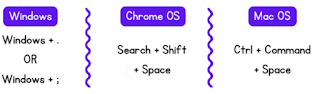
Checkout Emoji Copy -   All you need to do is click, hit copy, and BAM... it's ready to paste into your text! It's even searchable!!  Check it out here.  We have added this to our clip art and sound resources doc. 


Did you know, you can access the built-in emoji keyboards by doing this:


Virtual Field Trips~ 
EBOOK: 25 instant virtual field trips -- This ebook contains 25 of our favorite on-demand virtual field trips. 
TEMPLATE: Postcards from around the world -- This template lets students write about their experience in the virtual field trip. It's a great way for them to summarize and reflect what they've just seen! 

PDF Candy - A free online PDF Editor with a lot of bells and whistles you would expect from something that cost big bucks.  PDF Candy allows you to change, edit,
or transform any PDF into another form. Imagine taking the PDFs and editing them, download them to Microsoft Word (Convert to Googel Doc), merge two PDFs so
that they print together, or SPLIT a PDF into two different pages. PDF Candy allows you to do this and so much more. It even features an "Extract Text" option that eliminates ads and pictures prior to printing a larger file.  CHECK IT OUT. 


The only thing better than a spreadsheet is a spreadsheet with Wordle in it.  
You can grab the sheet here, but better yet, learn how this was recreated in Google Sheets 


Looking for ways of using Wordle in your class for engagement? Check out these ideas. 

Speaking of Google Sheets - You can even make an Etch A Sketch with sheets! 
The power of sheets never fails to surprise me.  Here is how this was made.  (You can make a copy of this sheet here.) 


30 sites for students with free time on their hands - Check them out here. 


Rainbow "Scratch-Off" Drawing Templates for Jamboard - COOL  Check them out.  (We have added this to our JamBoard doc, where more links to templates can be found.)

Jamboard: Add a Background from Canva - How-to here.  

The templates below have been added to our Jamboard doc that contains many more great ones!

More Jamboard Templates: 

CANVA TEMPLATES FOR SEESAW 


SeeSaw templates for:
  • Announcements
  • Newsletters
  • Activities
  • And more!
If you do not have a Canva account:
Canva for Education - A great free online graphics program. Available to K-12 teachers and their students. 100% free - now and forever.
More info here. You will need to create an account in Canva.  Educators may request a free premium account, and they are usually approved in about a week.


πŸ’₯ T𝗲𝗰𝗡 π—Άπ˜π—²π—Ίπ˜€ - Tab groups, AR, exit tickets, tech updates and more in this weeks tech tips

Thursday, January 13, 2022

 2021 GOOGLE RESOURCE ROUNDUP - Look back at the top 2021 Google resources from TCEA.  Worth the look! 


Schedule Posts Across Multiple Classes in Google Classroom - Remember, we have this in Google Classroom because we are a part of the alpha testing.  Keep improving this product and complete the required mid-term pilot survey.  Please feel free to review the FAQ doc if you have additional questions, or email questions to edu-pilot-program@google.com. 


MathBots offers a variety of resources for basic math instruction, including manipulatives, question generators, puzzles, printables, and more. 

Another GREAT math resource -Digital Math Tools. Checkout their resources for HS, MS and EL age classrooms.  (The Mathbots resource listed above came from here.) 


Want to create a badge board for student progress?  Here is a template, badges, how-to-video and more!  (Customize the badges and spreadsheet for your needs.) 

Watch this short 5 minute video to see this in action and how you can customize it.


Misc. Tech tips:

A New Way to Add Students to Flipgrid! - Flipgrid released a bunch of helpful updates. Now you can invite them by simply sharing a link to your group. More info on this update here, from one of my favorites... Richard Bryne. 

How to Use Google Keep as a Comment Bank - Use Google Keep to have a comment bank in Google Documents without using Chrome extensions or Google Classroom. More info here!

12 Gmail Tips for Teachers - With a short video tutorial for each topic/tip.  Check them out here. 

11 Google Drive Features Everyone Should Know About - This is really a great slide show of tips that are worth looking at. 

The 8 Best Ways to Use Google Sheets Like a Pro - Check them out here. 

I love Chrome's tab groups!  If you are not using them... here's how.   Here is how to preserve them after restarting Chrome.

Time-Saving Tips and Tools for Teachers (Part 1) - Check them out here!

Kacy Bell's Quick Tip Video Library - These 1-minute quick video tips are always worth a look.  

How to Create Citations and Bibliography in Google Docs - How-to here. 

15 Collaborative Tools for Your Classroom That Are NOT Google - Can you believe I am listing this one as I sip on my Google Kool-Aid?  <grin>  Check them out here. 

This will impress your friends and kids - and it's just cool.  How to Create Videos of Augmented Reality Animals.  Watch an Emu walk around your classroom or a platypus swim around the room. 

Did you know you can prefill a Google Form with some options/answers selected?  Here's how. 


@Quizizz added a new question type!  They now have a draw option for quizzes and lessons. You can offer an image or a blank background to draw over. 


Want to improve your teaching? Connect better with students?  Give exit tickets a try!
This template cleverly uses the theme builder in Google Slides to make an exit ticket generator! Edit the tickets before assigning by going to Slide → Edit Theme.


Kahn Acadamy - it's one of the best teacher resources!  ⏳ Save time with auto-graded practice. We know you’ve a lot on your plate this fall. So here’s one way to save time: Let Khan Academy handle the grading! Just search for your desired practice topic. And then click the Assign button at the top of the exercise - and now your students get to build their skills, while you get to skip the grading.

πŸ•° Save even more time with scheduled assignments
But what if you want to save even more time by setting-up assignments in advance? Now you can!  Just set a future start date/time when you click Assign and Khan Academy will automatically roll out the assignment to your students at your chosen moment:


⚡ Help your students track their assignment success
And once you’ve got your assignments scheduled and auto-graded, help your students make the most of them with our new Data Trackers!  These tools empower your students to measure their progress - and are fully customizable for your class.  Check them out here! 

Canva - It's one of our top 5 classroom tech tools!  How are you using it?  This may help... 20 Ways for Students to Use Canva in the Classroom.  
Remember, this online program is free to you and your students! 


πŸ’₯ T𝗲𝗰𝗡 π—Άπ˜π—²π—Ίπ˜€ - Soundboard, templates, K-6 tools, NEW math whiteboard, updates and more. Some great tech tools in this weeks update!

Wednesday, November 17, 2021

 Make your own sound board- great for games and classroom use!  Grab this pre-made one here! Check it out.  (Note published slide, and different sounds on each slide.) You can make a copy of it here. 


Graphic from Tony Vincent - @tonyvincent (Great resource to follow!) 


Attention Math teachers!  - Math Whiteboard is a fantastic free interactive whiteboard tool designed specifically for teaching and learning math 6-12.


About Math Whiteboard

You can check out the tool at: https://www.mathwhiteboard.com/

This free webinar will give you a great overview of the tools! (You have to watch the video to see what it does! Playing around with it, you will not see the many functions of this product.) It will have a learning curve, but looks like it may be well worth it!

Key features include:

  • Totally free!

  • Collaborative - Share the same collaborative math work space with your students

  • Write or type math - Math entry is easy with handwriting recognition or you can just type your mat

  • Runs in your browser - No installation required, it just runs in your browser on any device, Chromebook, iPad, Windows Tablet, etc.

  • Computer algebra system - A full computer algebra system enables calculations from arithmetic to calculus

  • Import pdf files - You can make your pdf assignment files your background


An exciting update to Scenes in GoGuardian Teacher! - Their most requested GoGuardian Teacher feature is here! Now, teachers have the ability to personalize digital learning environments for students individually and in groups — even when they’re in the same class. Watch the video to see it in action. (More info here in their help article.)  With this new GoGuardian Teacher update, they've made it easier to tailor your instruction to individual student needs, providing a more engaging learning experience for every student.


7 Ideas for Collaborative Video Projects – And a New Video Editor  -Check it out here.   Remember Canva is free for teachers and students! (More info here.) 


Did you know Google Chrome has a QR code generator built in? 


Misc. tech tools and updates:

Google Docs gets a new insert tool to make life even easier -  As you write, type the @ symbol and the popup menu will appear.  More info here!

The 10 Best Google Sheet Quick Hacks You Probably Didn't Know -  Article here. There were a few new ones for me in this list! 

Create Custom Maps With the National Geographic Map Maker - 5 minute how-to video here. 

Great sound board for classroom games, review and more! - Check it out here!  (Scroll through the slides to change the sounds on the board.)  Here is the version to make a copy if desired.


Virtual Labs for Interactive Science - Want a handy list of virtual labs for science?- There are several free ones in this list as well.  Take a look!

What Is Google's Interactive Periodic Table? - More info here. 

Here's a great tip from our very own Erica Twarling for the IS & ES students:  I just wanted to share a great website that I learned about yesterday from Amber Vlasnik at the ESU for Cooperative Learning. It is called https://www.theteachertoolkit.com/  They have some really great Kagan like structures and strategies and show videos and have templates for both lower elementary and upper elementary classrooms. Check it out!  Thanks Erica! Our staff rocks here at Norris! 

Power User tip- It's a good one!   Search Google Drive and Gmail from the Chrome Omnibox! Checkout the video or blog post to get you started. 

Do you need some "edutainment" activities for the K-5 kids? Over 150 activities for kids! Perfect for those times when going outside for recess just isn't an option! "RoomRecess.com" is dedicated to providing children with free learning games that are fun.

6 Crazy Google Sheets Formulas That Are Extremely Useful - Check them out. 

Updated - An Overview of Google Forms Quiz Settings - Checkout this short video here. 

How to Find and Manage Google Slides Add-ons -  Checkout this short article and video here.

How to Use Google Books - tip by Richard Byrne @rmbyrne in one of the best! Google Books is one of my favorite search tools. Unfortunately, students often overlook it as a research tool unless they've been shown how it works. In this short article/video I provide a demonstration of the key features of the current version of Google Books. 


Get Your Free Copy of The Practical Ed Tech Handbook - More info here.  Download it here.  Richard Byrne @rmbyrne in one of the best! 


Feeling the CANVA LOVE!  -This is a must-have tool and account for all teachers! 

How to Create a Google Classroom Header with Canva - There are hundreds of FREE templates for teachers in Canva for Education! There are even templates for your Google Classroom banner or header. Here's how to customize and upload to Google Classroom. Watch this quick video to learn how!  Bonus tip- Canva has added the ability to make and publish websites.  (We still recommend Google Sites for our staff and students.) 

We just love Canva, here is one more reason - How to Use Canva's Image Background Remover. 

How to Use Canva Templates in Google Slides -  Quick tutorial video here. 

They give educators the pro version for free!  Super simple! It's the best online graphics program for teachers. (And now for video, websites and more!)  Sign up for an educator account here to get the paid features for free.  100% free for educators and their students! 


Awesome free templates in Canva! A nice free Keyboard Shortcuts poster is available for teachers here. DLFedder Designs has a ton of free posters, printouts and more... Check them out here!


Google Arts and Culture app is worth checking out! Want to go on a field trip

to MOMA? The Louvre? You CAN! Use Google Arts and Culture and this handy
teacher guide to get started. "Google Arts & Culture is a rich, interactive
digital resource that invites users to explore the arts, science, history, technology, and the many ways those disciplines intersect with each other. "

Google Docs add watermarks - NEW feature.  Want to add a watermark to a Google Doc? It just got easier! Go to Insert - Watermark and upload your image. Set the size and auto fade! Super way to keep your brand present OR to make all users aware of "draft" status of a Doc!

Educational and Online Games for K-5 Kids - TurtleDiary! An award-winning educational website offers tons of fun, learning-based activities for children in grades K to 5

Use Mote to Share Voice Notes via QR Code - Short how-to video here using this great free tool! 


"What I Am Thankful For" Turkey with Google Slides -  Fun project for creativity, tech skills, and practicing gratefulness! 


Thanksgiving Template for Google Slides or PowerPoint Presentations - checkout this impressive template over at SlidesMania! 


Did you know?  Sketchup (CAD like drawing program) is free for schools.  We have it installed and ready to use at anytime.  Click on the waffle menu and scroll to the bottom to find the Sketup icon to get started. 


Introduction series: Sketchup for Schools Part1: Orientation https://youtu.be/-UoI9vTg5rs Part2: Navigation https://youtu.be/fCSSY4xuc0I Part3: Modelling https://youtu.be/NRdd7VT-Qi8

They also have a few curriculum lessons already for you. 

Remember to think outside the box with Google Slides!
(Some great tips from DLFedder) Adjust the page size to vertical for newsletters or change the size to be 1080 x 1080 for the perfect Instagram post! Or have your students design your Google Classroom Banners and adjust the size to 1600 x 400! Just go to File - Page Setup and choose custom to get started!!


Here are some sizes for other projects: 


Edit PDF files in Canva! - Checkout this short how-to video here. 


Did you know you can publish your Google slide shows to the web?

Want to create a slideshow and share it publicly so anyone can click and view? Super easy with File -  Publish to the Web! You can even set it to auto- advance or get the embed code and embed it into a website! This is great for creating photo slideshows, review tools, or a platform for showcasing student work.


K-4 teachers - This one is a winner!  Toy Theater has so many great tools.  Spend some time taking a look at what's here!

Just one example and quote from an elementary teacher... There are SO MANY amazing virtual math manipulatives available! I'm still partial to those that help with fractions like this Toy Theater one.