Noel Erskine, Technology Coordinator Norris Schools

Welcome to my technology blog.
Follow me on Twitter, @noelerskine
Noel's Home Page

Ramblings: Some nice classroom resources and a great update to Google Docs.

Thursday, May 3, 2012

Some great new features in Google Docs: 
Did you know we now have over 450 new fonts in Google Docs???  If not... you need to look at this! 
A nice quick overview of the new features in Google Docs:

Awesome Jeopardy game site!  (Great for review days, etc...) 
JeopardyLabs - create your own template or browse for already created templates:  http://t.co/mFellmzY

Great searching lessons
Another plug for Ruhl's link this morning.  This is a great learning tool for teaching students (and our selves) how to search.

Gmail meter is an interesting and simple way to get a look at how you are using your mail.  It is also a great way to introduce you to the power of scripts. 

A few nice IOS (iPad, iPhone) apps

Paper is a simple drawing program that is worth a look.  It had over 1.5 million downloads in it's first two weeks.  Simple and elegant. 

Remember this iPad tutorial app for new beginner's is free for a limited time.  (It is a large program, so it will take some time to download.)

National Archives Education Specialist Visit Norris Students and Classes.

Monday, April 16, 2012


This one hits pretty close to home! I thought I would just publish our press release here, but you need to know how fortunate I feel that Norris Students have the opportunity to experience not only the National Archives, but an educator who commands the respect of every student he has taught and every educator that comes in contact with him. We are fortunate that he is able to reach our children from around the country by offering over 250 video conferences to schools from New York to California. If you are reading this from a school district that has not utilized his services, now might be the time to check out this great resource for your school.


Press Release:
National Archive Education Specialist Making Local Ties to Norris Students.
Firth, Nebraska 4-16-12.

David L. Rosenbaum, an education specialist at the National Archives in Washington, DC., visited with students at Norris High school on April 12th and 13th.  His presentation during Mr. Rick Koenig’s ninth grade American History Classes focused on the vast resources available through the National Archives and using the many primary resources that are available through the archives.

Mr. Koenig’s classes have connected with Mr. Rosenbaum and the National Archives for several years through video conferencing. Norris schools have utilized video conferencing resources for the past twelve years and have included the National archives for the past three years since since their program started. Mr. Rosenbaum was instrumental in the development of the distance learning and video conferencing programs at the Archives. As he stated, “It’s great getting back in the classroom as well as getting to meet the staff and students that I often only get to meet through video conferencing.”

Mr. Erskine, Technology Coordinator at Norris Schools, knew Mr. Rosenbaum from his days teaching at Tri County. “Mr. Rosenbaum is a master teacher. I was fortunate enough to teach with Dave, and was blessed that he taught and worked with my children.”  As Mr. Erskine noted, We are fortunate to have these kinds of resources to bring into our classrooms.  Internet, video conferencing, distance education and a variety of technology tools enhance the curriculum throughout Norris Schools.

Mr. Rosenbaum has been with the Archives since 2007. His primary duties include video conferencing, scheduling teacher groups that come to the National Archives during the year, conducting teacher workshops & outreach presentations, monitoring the Boeing Learning Center, providing tours for educational groups, and researching/creating teaching activities which focus on the use of primary sources.  A native of Albion, Nebraska, Rosenbaum is a long time educator, having taught Social Studies and coached in Nebraska for 27 years at Tri County Schools in DeWitt. He taught a Social Studies Methods class for Doane College from 1994-2004. Rosenbaum obtained his BA in Secondary Education/Social Sciences and a MA in Curriculum and Instruction at Doane College in Crete, Nebraska.


GREAT RESOURCE: 
Dave's Top Eleven Stops on Archives Website
Top Eleven Valuable Tools
@ www.Archives.Gov

11. Digital Vaults- NEW!- http://www.digitalvaults.org/#

The National Archives new "Digital Vaults" exhibit delivers an online experience that is unlike any other. With
a database of some 1,200 documents, photographs, drawings, maps, and other materials and a keywording
system that visually links records, the Digital Vaults enables visitors to customize their exhibit experience and
to create posters, movies, and games that can be shared by e-mail.


Presidential Libraries present vast archives of documents, museums full of important Presidential artifacts,
interesting educational and public programs, and informative web sites.


The National Archives is more than just the National Archives Building in Washington, DC. Our holdings are
located in a nationwide network across the United States. Our Regional Archives provide a glimpse into the
history of our country through documents, photographs and artifacts found only in their unique holdings.


Many helpful articles including; guidelines for using primary sources, how primary sources help teach and
reinforce historical thinking skills, suggested methods for integrating primary sources into classroom instruction,
some universal truths about teaching with documents, and what you can do with resources from the National
Archives.

7. America’s Historical Documents http://www.archives.gov/historical-docs/

The National Archives preserves and provides access to the records of the Federal Government. Here are twenty
great examples from our most celebrated milestones to little-known surprises.


You will find four pages of unique exhibits past and present at the National Archives. Each one is filled with
great information, many documents, and appealing visual displays.


You will find amazing articles and background information on America’s BIG THREE; the Declaration of
Independence, Constitution, and Bill of Rights. There are high resolution images, information on the Founding
Fathers, the Faulkner Murals, and a chance to join the signers of the Declaration of Independence.

4. Lesson Plans & Analysis Worksheets http://www.archives.gov/education/lessons/

This section contains reproducible copies of primary documents from the holdings of the National Archives of
the United States, teaching activities correlated to the National History Standards and National Standards for
Civics and Government, and cross-curricular connections.


Learn about engaging workshops, videoconferences, and summer institutes for teachers.


To help us think, talk and teach about the rights and responsibilities of citizens in our democracy, we invite you to explore 100 milestone documents of American history. These documents reflect our diversity and our unity, our past and our future, and mostly our commitment as a nation to continue to strive to "form a more perfect union."

The Archival Research Catalog (ARC) is the online catalog of NARA's nationwide holdings in the Washington, DC area, Regional Archives and Presidential Libraries. Updated- more user-friendly! Nearly 130,00 digitized documents.

Contact Info for your School:


National Archives and Records
Administration
700 Pennsylvania Avenue, NW
Washington, DC 20408-0001

Contact Dave Rosenbaum- Education Specialist
david.rosenbaum@nara.gov
202-357-5077 office
202-357-5377 videoconference room

Videoconference Request form on our website:
http://www.archives.gov/education/lessons/constitution-
workshop/

Workshop Topics
United States Constitution (Document Analysis)
Introduction to NARA
Teaching with Documents (Teachers/Staff)
Article II The Presidency
Article III The Supreme Court
Famous American Speeches
The Great Depression
Transportation (Elementary)
Tour of the Nation’s Capital (Elem/MS)

Some more tech resources for educators

Friday, April 6, 2012


25 TED Talks Perfect For Classrooms
 http://edudemic.com/2012/03/25-ted-talks-perfect-for-classrooms/

7 Resources for Teaching and Learning Anatomy and Physiology http://www.freetech4teachers.com/2012/02/7-resources-for-teaching-anatomy-and.html


Some slidesharing and screencasting options http://goo.gl/LPTFE

Language arts - activity and worksheet generator  http://www.toolsforenglish.com/ 

Want CAPS LOCKS on your chromebook: just press Shift+Search to enable & disable

7 Resources for Developing Typing Skills http://t.co/4JYjx0Jf

Want to share a screen with a class?  https://join.me/ or try: http://www.screenleap.com/

Top 20 Must-Have Educational iPhone & iPad Apps - http://www.techholik.com/top-20-must-have-educational-iphone-ipad-apps/

PearlTree is a really cool web tool and site and you HAVE to checkout this PearlTree of apps: http://goo.gl/GQlfX

The best thing about the New iPad for education may be the $100 off the iPad 2.

Tuesday, March 20, 2012

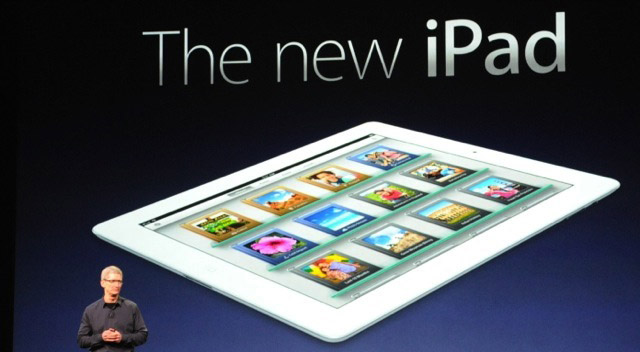
Well, after spending a day with the New iPad,  I am finding some pro's and con's to Apples latest offering.  The step from the original iPad to the iPad 2 was huge in my mind, but the step from the iPad 2 to the "New iPad" (What's up with that name!) is much less...especially for education. There are some nice new features, and depending on your needs may be critical but I don't see it for educational needs.

The better rear camera is great, and for a consumer will be a welcome update, but for education do we really need a better camera with larger files? Is HD video necessary for class projects given the extra problems associated with larger files? My conclusion is no.

The display is nice, but so was the iPad 2's display.  I can see a few differences, but to be honest... they are slight for what I am doing with my iPad.  I even have a few apps updated for the new Retina display, and still no wow factor for me. I really do not see the need for our classroom uses at the current time.  Yes, it will stream video at 1080p, but most of our videos we use in school are not high quality and very few will have the new Apple TV to accommodate the 1080p let alone a big flat screen TV with 1080p.

The faster processor may be needed in a few years, but right now each app I used side-by-side with my "old" iPad2" showed no speed difference. By the time any of us need the speed, there will be another new iPad on the market. (Not to mention the extra heat given off by this increase in processor speed.)

The hot spot sharing and  4G LTE could be a killer feature for the consumer or mobile warrior, but for most of our educational needs we are just ordering wifi only models.

It was a welcome surprise that Apple kept it's same pricing structure for the New iPad including it's similar battery life. (That's especially impressive with the 4G LTE models.)

What do I think is the best thing about the New iPad for education?  It's that the price on the iPad 2 16 gig units were rolled back $100 to $399. That's a bargain for what may be the best iPad for schools at the moment. I do wish they would still produce the 32 gig iPad 2 units as well, but it looks like that is not going to be the case.  Don't get me wrong, the New iPad is now the best tablet on the market and continues to push the boundaries, but I think the best news was that the iPad 2 just got more affordable for schools and kids.

Your thoughts...........????

Just a few misc. resources for staff and check out Lucid Charts too!

Friday, March 16, 2012

Working in education and technology is awesome and seeing all of the great resources that are available to teachers and students is one of the more compelling aspects of this job.  Each week I share numerous resources with our staff via staff emails and my Twitter feed, but sometimes I like to share a few in the blog as well.  Here it goes... 

Top 10 Sites for Creating a Chart or Graph http://goo.gl/Dg068  (Notice Lucid Charts is one mentioned.  We already have that installed in our Google Apps, and you will read a little more about it later in this entry.) 


PBS has a great site with videos and a ton of other resources.  You can sign up for a free account too.   http://www.pbslearningmedia.org/  

Free iPad Math App- Elem.
Addition UnderSea Adventures: This colorful and visually stimulating app will dazzle your child as he explores the under water world with math. Children reveal puzzles of underwater scenes by solving simple addition problems. Puzzles increase in difficulty, each with a new scene to reveal. (FREE)

Free iPad Math Game App- Elem.
Island Chase Subtraction is free in the App Store for the month of March. Go get it if you haven't done so already!  (Courtesy of Barb Bentzinger  Thanks Barb!) 

10 Recommended YouTube Edu-tainment Channels. This is a nice list for starting your YouTube subscriptions. Check out the list here.

Google Apps
I love this product, and all of the companies that tie into Google apps.  

This week, Google just added the ability to label and/or star your email messages before you send them.  What a nice feature to be able to remember to followup on those important messages you send.  Read more about it here. 

We just added Lucid Charts to our Google apps this week, and this product is awesome!  This is a great product and this company offers their product free for school to use.  Thanks Lucid Charts for not only making a great product, but they allow us to use it with our students at a cost we can afford! 

iPad not connecting to wireless?

Friday, March 2, 2012

Here are just a few quick notes we share with our staff:

If you are having trouble with wireless, you can simply turn it off, and then turn it back on again. This often fixes the issues. 

When you close an app on the IOS devices, it really does not close.  Normally that's OK, but sometimes you will want to close all of your apps if one is giving you a problem.


Many teachers do not realize, that hitting the sleep button does not really shut the iPad down. 

Reset device. (Does not cause loss of data.)  This will solve many problems!

Some new Facebook features that teachers need to be aware of, before it's to late.

Wednesday, February 1, 2012

I am not putting this out to scare anyone, but you need to be aware of some new features coming to Facebook. (A big thanks to Paul Bade for tuning me into this one!) Facebook is adding a new feature called timeline.  Staff need to be aware of the potential of old pictures, posts, etc... becoming public in this timeline that you may not want to be public. Here are a couple articles that will explain what you may need to know on this. 

Ready or not, you're getting Facebook Timeline - CNN  http://goo.gl/684Ro 
Prep for Facebook's Timeline Layout: 6 Must-Do Privacy Tweaks - PC World  http://goo.gl/HVxYE