Noel Erskine, Technology Coordinator Norris Schools

Welcome to my technology blog.
Follow me on Twitter, @noelerskine
Noel's Home Page

Start the new year off right with these apps, sites and tools for the classroom. Free Apps, web tools, and more!

Monday, January 13, 2014

Misc. Web Resources
Bulk QR Code Generator - This page allows you to generate up to 100 QR codes at once! 

5 websites with massive amounts of free educational resources: seekoutlearning.blogspot.com/2014/01/5-webs…

Three Good Tools for Building Flipped Lessons That Include Assessment Tools ow.ly/suakr

PLN Starter Kit - Livebinder: livebinders.com/play/play?id=4…

11 free online typing practice activities for students: ly.tcea.org/krxwq

Chrome apps and extensions:
4 Chrome Apps for Student Creation 
The new Chrome Apps: We pick the best via PCWorld slide deck. 

Google docs grading tips & tricks! goo.gl/SwKqZS

IOS apps:

Taking a poll or doing online quizzes on the iPad... These apps are awesome! 

Five Free iPad Apps for Elementary School Math Practice ow.ly/suaxj

The 55 Best Free Education Apps For iPad teachthought.com/apps-2/the-55-…

8 Great iPad Apps for ESL Students edudemic.com/top-9-fantasti…

5 Apps and Web Tools for Elementary School Students edutopia.org/mobile-apps-fo…


Here are a few great apps and resources, compliments of our MS media specialist, Jessie Andre. (Thanks Jessie!) 
Virtual Manipulatives  iOS app (They
  have provided a virtual set of fraction bars on www.abcya.com for several years. But now, they have a free iPad app too!) 


Tellagami this is a Google and iOS app

Tellagami is a mobile app that lets you create and share a quick animated message called a Gami.

A Gami can be an exciting tweet or status update. It can be a fun way to tell a story. It can be a thank you message or a vacation postcard. It can be a birthday greeting, party invite or cool way to share photos.
Create a Gami in 3 easy steps. 1 - Customize a character and choose your background. 2 - Record your voice or type a message for your character to say. 3 - Share your Gami on Facebook, Twitter or send via text or email.


Movenote  This is a Google and iOS app

Movenote demo

The Movenote app let’s you record video alongside documents or pictures to create an integrated video presentation with slides. 

Creating presentations is easy and fast. Simply record video with your device and swipe to synchronize the slides to the video. Presentations are shared by sending a link to the recipient and can be viewed without the app.

First add the material you want to present to form a slideshow. Add pictures from your photo albums or take them directly with your camera. Alternatively bring a document from your mailbox or cloud storage like Dropbox. Also you can combine material from all these different sources. Secondly, record the video and simultaneously change slides by swiping. The recorded presentation will play out with the exact same timing.

ASK3 class presentation app:   
Ask3 turns iPads into interactive Whiteboards so that teachers and students can collaborate
Ask3 demo (YouTube Video)
The Ask3 app allows students to ask questions and classes to collaborate on the whiteboard presentation.  

Word Resources:

These resources were recently sent out to our staff from Char Brotherson.  Thought I would promote them in my email/blog as well!

These seem to be great sights for word parts.
roots and prefixes

This one you can type in a part and it will give you words that contain it.

YouTube Resource:

If you have not subscribed to the Crash Course YouTube channel, now is the time!  It has a ton of great video resources for the classroom. (Thanks to Jessie for promoting this resource, it's awesome!)

Some great free apps from Autodesk! 
Autodesk just announced it's 123D Circuits app. With 123D Circuits you can create projects ranging from simple blinking LEDs to complicated circuitry for DIY robotics. The thousands of shared circuit designs give you a springboard to start from on your own projects. 

The easiest way to get started with 3D
Discover free apps to take you from photos to modeling to making. These apps from Autodesk are worth checking out!  (This list will soon include the 123D Circuits app mentioned above.)

My Christmas goodies list for teachers... Free iBook (or Kindle book), Free apps, and great web sites!

Thursday, December 19, 2013

Web sites and web 2.0 tools:

QR Code Classroom Implementation Guide - http://coolcatteacher.sharedby.co/share/vp4fG1 from the Cool Cat Teacher. 

25,000 Images of Art That You Can Re-use for Free ow.ly/rEn1g

Video - Three Ways Students Can Search for Creative Commons Licensed Images via Free Technology ... tinyurl.com/nqaf6aq

7 math based websites to discover (again)

This is a great collection of free Web 2.0 tools for the classroom: ly.tcea.org/ogdhi

16 Best Free Mac Apps (If you happen to have a MAC) 

Google tools and tips: 
A must have app for templates in Google Docs - http://goo.gl/EzQZc9  <-- You need to add this one!

Envelopes for Google Drive via Free Technology for Teachers - Envelopes for Google Drive is a ...http://goo.gl/UCbmvi

Google Tips Helps You Do Cool Stuff With Google Products -Cool site!

Now there's a new way to manage folders in Google drive that you folder lovers will enjoy -- check it out!  http://goo.gl/DcwPYN

Send files up to 10GB (that's a 600-page presentation, or a 10-minute power ballad) with one click. Find out how:  http://goo.gl/wLofea  (This is from that new Gogole tips site... Cool!)

Google Apps Update | Guide to the New Google Sheets - 7 min. video - Worth the watch! http://goo.gl/NO3hD5 <-- Great new features in Google Sheets! 

Gmail read receipts may not work as well now - FYI

Some of you use the Gmail, read receipt's feature.  It's functionality has changed when it comes to sending emails to other Gmail users. 

Here are a couple links as to why:

This one relates to Boomerang (Which many of us use as a great tool!) but relates to standard read receipts in Gmail:


It's interesting to note, that this change actually will improve some sucurity as noted from the article:

One side effect of Gmail’s new policy is that it is no longer possible for companies who offer less-ethical implementations of read receipts to report your IP address (and approximate location) to the sender of the email. Google now reports the location of all opens as their campus in Mountain View and that your computer is one of their servers.

This article is similar, if you want more background info. 

Android Apps and tips: 
OpenEd Releases an Android App for Sharing Educational Videos With Students via Free Technology ...  http://goo.gl/X9dJ2d

BlendSpace - This one deserves it's own heading!
Blendspace: Create lessons in 5 minutes. 

Here is how one Nebraska administrator (Brad C. Jacobsen (@BCJacobsen)) uses it for staff development.

Add the Blendspace Chrome app to your browser.

Free iBooks!
The wonderful iBook ... A Charlie Brown Christmas is free for a week beginning 12/18: ly.tcea.org/ftmyw  (There are several other free books, each week this season.)  (The android version for Kindle is free too, just search the Google Play store.) 


IOS (iPad/iPhone) apps:

Ten Good iPad Apps for Elementary School Math Practice 

4 free Math Dojo Apps are free today! goo.gl/GkhmDf 

Seven Free Science Apps for Your Students' iPads ow.ly/rRQxb


I want to wish everyone a Merry Christmas!  May this posting find you in great health and spirits for the holiday season. 

A must have app for templates in Google Docs.

Monday, December 16, 2013

There are a ton of great templates in Google Docs, but earlier this year Google changed the way we access them.  See this short Google post for more info.

The new way is to open up a blank Doc, presentation, etc...  and then from the file menu, select New then From Template. I guess this works, but it does not make sense to me. (Create a doc first then select "from template" seems backwards!)


If you add the Drive Template Gallery chrome app, it then adds that selection directly to your create menu in Google Drive.   <------------  In my opinion, this is a MUST HAVE app! 


Here at Norris, we have a lot of templates for budgets, letterheads, etc... found in the document template section, under our nsdtitans.org domain.


Take some time exploring templates that are in the gallery.  You will find some that are good, bad, and maybe ugly... but there are some definite Gems in the group too!

My list of great tech tips, tools and sites for the week!

Tuesday, December 10, 2013


Some great web 2.0 tools and sites: 
Two great story telling tools from Google - add a new tools into you and your student's classroom presentations and projects! 

Use free service presentation.io to easily share your PowerPoint with students on their devices. (Remember, in Google Presentations, you  can easily download the presentation as a PowerPoint to use with this display service.) 

Three Places to Search for Free Online Courses ow.ly/reL3K

Free Technology for Teachers: A Few Tools That Make It Easy To Analyze Your Writing

60 ways to use Twitter in the classroom, divided by categories so it's easy to use: 

5 Seriously Amazing Science Education Websites bit.ly/18VjWd2

30 Apps Perfect For BYOD Classrooms (Make sure you look at the Symbaloo at the button, that has all of the direct links.)

LiveSlide: Create decks from scratch or import a PDF. Send out live polls and see the results instantly.

Blend space - Create some great blended lessons is about 5 minutes with this free resources. They also have a nice Chrome app. 

Are you a Math Teacher -- this one's for you... A collection of free apps that support or align with the CCSS Math standards ow.ly/rx2kU 

45+ Teacher Recommended Educational Apps : From Teacher Reboot Camp 

Great resources from our own Norris Twitter users!

Remember, it's all about who you follow. Twitter can be the best educational resource you have for your professional  development.  Set up your own PLN (Personal Learning Network.) today. 

From our own Lisa Spilker's Twitter feed (@LisaSpilker) -- Thinking about how to implement "Genius Hour" in our language arts block goo.gl/mTOaqH Inspiring! What a great idea-- give it a try in your classroom! 

20 Education Technology Tools Everybody Should Know About buff.ly/18iJmO5 Thanks to out own @CAHutzler for this great Tweet.

Google Chrome
Ginger is a grammar and Spell checker extension that get some great reviews.  (Here at Norris, I have added it to our nsdtitans.org Chrome Web store of recommended apps.) 

AMESOME TOOL!!  This may be one of the best accessibility apps for Chrome.  You have to check it out, even if you do not need it. Announcify.  It reads the web page to you, and greys-out the area's it is not currently reading.  Really Cool!   Combine it with the Clearly Extension for simply cleaning up the web page for online reading and you have a powerful duo! 

Google Apps tools and tips: 
25 tips & tools to make Google Drive better ow.ly/rbswv 

Synergyse Blog: Top 10 Google Apps Scripts for Education buff.ly/1ir8zQf  Thanks Charlie Hutzler (@CAHutzler) for this one! 

18 Google Earth Resources for K-12 ow.ly/rrd1F

Google Tasks: 
Do you use Google tasks to keep your task lists?
Did you know you can get a full page list of your tasks, by using this web address: http://mail.google.com/tasks/canvas 

YouTube:
Think YouTube is just about cute cats? Try these 197 different educational channels! ly.tcea.org/akudc

IOS apps:
USA Map Chart App (Free) is a powerful application that allows you to Create, Customize, Save & Share Map based (geographic) Charts on your iPad. With the Map Chart App, you can now present your ideas or information easily on a map. This app is ideal for personal use, school, business and other areas where data visualization is key.

Twitter tools
Some great apps for showing "Twitter Walls" in your class or educational events:

EDU Clipper - A nice free add-in to our Google Apps.

We recently added EDUClipper to our Google Apps Domain.  This product get a lot of great reviews, so if you have not looked at it, now may be the time to check it out. (It's located under the more apps here at Norris. If your school has not added it to their Google apps domain... Now would be the time!) 

EDUClipper, now has an app. 


Not a tech Post - But what I am thankful for this Thanksgiving

Tuesday, November 26, 2013

Where do I start... the list is so long, and I am sure I will forget something or someone with so many things to be thankful for.

I am thankful for a wonderful wife and family.  They are my strength, inspiration, and love of my life.  I am also thankful for my parents, including my wonderful siblings and their families.  It's easy to be thankful with so many wonderful family members in your life.

I feel blessed living in a free country where we can freely worship and live our lives in a free democracy because of the many sacrifices of our Veteran's.

I am thankful to work with so many great people within the Norris School district.  It is a special place, with so many great administrators, staff and students.  These individuals are molding our children and shaping our future. And from where I sit, I think the future looks bright.

It is easy to be thankful when God has blessed us with so much, but there are others less fortunate than us. I hope the warmth of the holiday season finds those in need.

Last, but not least... I am thankful for you... the readers of my words.  What a blessing for freedom of the press and words, that many of us occasionally take for granted.

I hope this posting finds you in good health and spirits this Thanksgiving.


Some web tools, apps, and tips for the Thanksgiving Week!

Sunday, November 24, 2013

Web 2.0 tools and web resources:

TVO, like PBS, has tons of videos on topics like science, nature, business, tech, education, and culture: http://ww3.tvo.org/

Looking for a source of short videos to improve grammar and writing? http://grmr.me/

100+ GeoGebra Tutorial Videos ow.ly/qtHGl

9 Amazing math websites you should explore goo.gl/6isNWd 

Some great mapping websites: seekoutlearning.blogspot.com/2013/11/10-fan…

Five Visual Dictionaries and Thesauri for Students http://goo.gl/f1kWlw

This great Google apps add-in deserves another plug from me. :) 
eduClipper - Getting Started with Assignment Portfolios - See what can happen with this great tool! - Nice Video to get you started.  (Remember, all Google Docs are web links, so it's easy to collect assignments, etc...) 

Check out the lesson Photosynthesis on Blendspace - http://edcvs.co/UEvGW6  There are a lot of other great topics on this site too! 

7 outstanding science based websites you may not know http://goo.gl/m9xKLc


Make your video's interactive - A great classroom flipping tool!
eduCanon - Awesome for flipping your classroom.  It allows you to stop a Youtube, insert questions or other content and really make it interactive.  Free web site too!  Here's a nice example of educanon - combining video with questions: educanon.com/public/185/445… (Y9ou even get to see a cool Air Canon in this demo of Newton's Law.)

IOS Apps:
A Handful of Free iPad Apps for Creating Videos ow.ly/qgcrS

How to Create an iTunesU class presentation

Have you seen the new features Google has added to their IOS seach app? Set reminders & be notified when you've reached the corresponding location and more!  <1 min YouTube shows you these highlights.

Trading Cards for iPad has been updated to work correctly with iOS 7! http://goo.gl/9cFNfK

Google Play Music is now available in the App Store  itunes.apple.com/us/app/id69179…  (Remember, Google Music allows you to upload up to 20,000 songs for free!)

For $.99, Math Slicer – Is Fun Alternative to Flashcards  But 123 Ninja - The First Numbers Slicing Game for Kids is free and looks pretty good too. 

Google Now is here for Android and IOS devices, and has a ton of features. "Google Now's voice commands brought together in a useful infographic" ift.tt/1fMeXN6 ift.tt/1bGddnO

How about some math apps?
Both of these games allow you to connect two iPads (Via Bluetooth) and play agaist another person.  They get great reviews from classroom teachers. 
5 Dice, is a free math game intended for upper elementary and middle school students that works on practicing their order of operations.
4 Dice is not free ($1.99), but a similar game for fractions. 

Early Jamestown is a free program that is an interactive textbook exploration of the early days of the Jamestown settlement and the state of Virginia. Great for the heistory teachers who cover this subject. 

Comic Touch Lite is a free app for the iPhone that allows you to draw and annotate pictures on your phone (or iPad) There could be several classroom uses for this type of app.  

Google Apps Tips and tricks:
I do like Google's calendar appointment options, but here is one more way to do it... Calendly - Conveniently Schedule Meetings Through Google Calendar goo.gl/fb/tpT1n

Add Voice Comments to Google Documents With Kaizena ow.ly/qgdkM

How to Add Attachments to Google Calendar Events ow.ly/qgdsE

18 Google Calendar tips and tools for power users - via InfoTech article. Get the most out of Google Calendar with these 18 tips, tools, and tweaks for power users

Five Apps to Render your Google Drive Much More Powerful ~ Educational Technology and Mobile Learning

Major Updates to Google Plus Hangouts, Photos-Videos-SMS | Via Google Gooru

Do you use Google to Search Certain Sites? If so, this amazing little chrome tip, will save you a ton of time! Short 2 min. YouTube on how. 

CTRL+SHIFT+V will paste text without formatting universally to anywhere. But Google also adds a remove formatting button that works great.  Remove Formatting of Text in Google Drive and Gmail. 

 14 Google Tools You Didn't Know Existed 

Good collection of little-known Google tips: ly.tcea.org/grgdd

18 Tips for Google Apps Users and Admins 

Online courses - Free from Google for teachers!
Learn how Google apps and other web tools can help you meet your teaching and learning goals.

Become a Spreadsheet Gooru  Here's the Hangout on Air

YouTube:

Google released a big update to their iOS Capture app this week. Nice run down of these features on PadGadget  <--- This is a great update to the IOS app! 

YouTube and Your Classroom - Nice handout to get you started with channels, playlists, and more.

8 Overlooked Useful YouTube Tools: freetech4teachers.com/2013/06/8-over… <--- This is a short must read if you are starting to upload and work with YouTube videos.

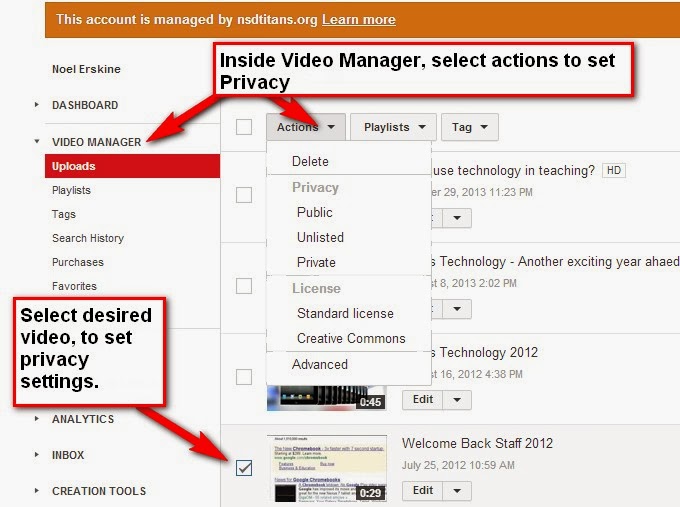
You can now restrict your YouTube video to only your school (Google Apps Domain).

Wednesday, November 20, 2013

Google Apps users who use their Google+ identity in YouTube now have the option to post videos that are viewable only by people within their domain. Domain-restricted videos can only be viewed through the web UI at this time.  (So IOS App or Android Apps will not view these videos at this time.)

This is a great feature for schools, since we now have the ability to limit the YouTube video to be seen by only our students or staff.  Prior to this, the video had to be either public, private or unlisted. If you wanted it to be restricted, using the private settings, you would have to list every person individually that you want to be able to view the video.  With over 2200 students and 150+staff at Norris, that would take a while!

Privacy settings include:

  • Public
  • Unlisted (Anyone with the link can view it.) (Similar setting in Google Docs.) 
  • Private (Only you and selected users can see it.)
  • Private Google+ shared video- New Feature!  Shared with Domain, Google+ Circle or other individuals. 

For more information, visit this Google support article:
https://support.google.com/youtube/answer/157177